Table Extractor
It turns tables in PDFs and scans into clean Excel tables. It runs offline on one Windows PC, and it shows you which cells to check.
- Version 1.1.0
- 70 automated tests
- Works offline
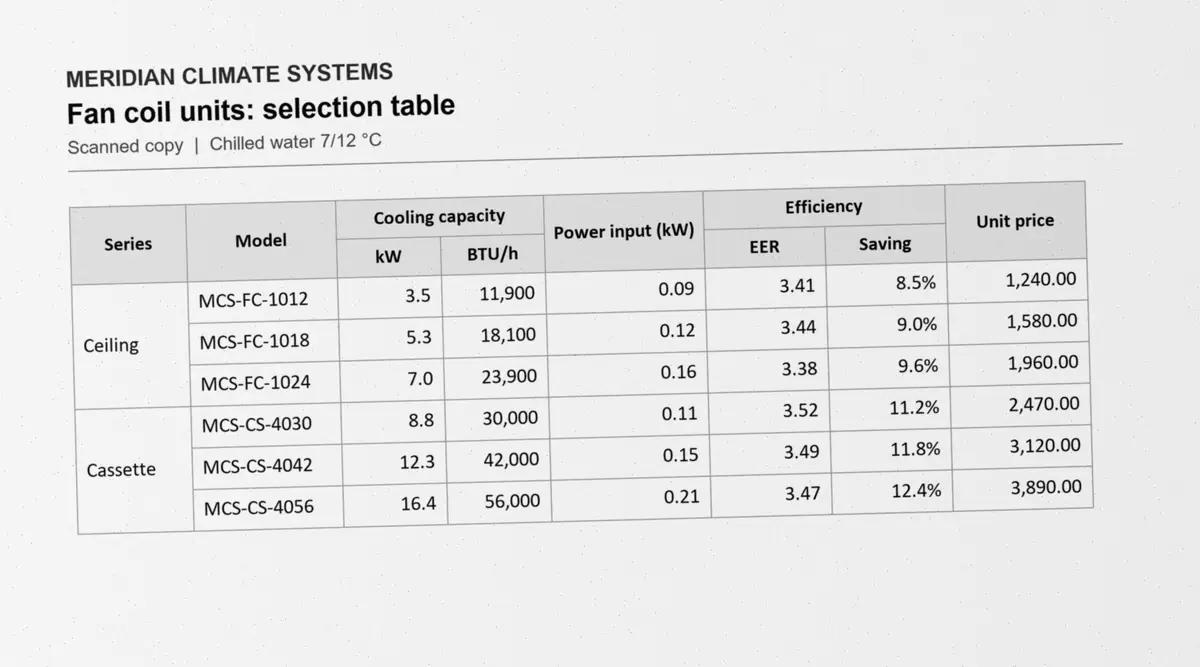
The problem
One real two-page catalog spread holds two tables. Every value has to reach a quote without a typo.
- 2 tables
- 45 rows
- 28 and 19 columns
Why ordinary PDF to Excel converters break here
- Tiny print
Small digits blur together on a scan, so a 3 can turn into an 8, for example.
- Labels merged four levels deep
One row label spans many rows. Converters often repeat it, drop it or shift the rows.
- Tables across a spread
A table starts on the left page and ends on the right. Converters give you two broken halves.
- Stars stored as symbols
Some model codes carry stars drawn from a symbol font. They come out as odd characters or vanish.
- Faint grid lines
Office copier scans fade the thin lines between cells, so the grid falls apart.
- Stamps and side notes
A stamp or a side note on the page gets read as part of the table.
How it works
Five steps, in plain words. Open "Under the hood" for the technical detail.
Open
A digital PDF and a scan are read in different ways. A digital PDF already holds its text. A scan is only a picture.
Under the hood
pdfplumber reads the words and vector lines of a digital PDF. PDFium renders each page at 300 DPI or more for the image path.
Clean up
Scans are straightened and sharpened before anything is read.
Under the hood
OpenCV deskews and auto-rotates the page, removes shadows, and upscales pages scanned below 300 DPI.
Find the grid
It finds the rows, the columns and the merged cells.
Under the hood
Line detection, plus recovery of faint lines. Cells are merged only where no line splits them. Tables without lines are split by white space and alignment.
Read the text
Text in a digital PDF is copied exactly. Text in a scan is read by OCR (software that reads printed text from a picture).
Under the hood
PaddleOCR PP-OCRv6 models run on ONNX Runtime, on the CPU. Cells it is unsure about get a second pass.
Check and export
Every cell gets a type (number, date or text) and a confidence score. Then it writes the Excel file.
Under the hood
Printed totals are checked against their rows. Cells are coloured yellow below 85% confidence and red below 60%. openpyxl writes the workbook, with document text always stored as text.
The review screen puts the page next to an editable grid. Click a cell to see its crop from the page. Tools: a "Needs checking only" filter, Draw table, Re-OCR and Move lines. It also joins tables that continue across pages, including tables whose columns carry on to the next page.
How accurate it is
Measured on a real manufacturer catalog page and on spec sheets, in four forms of the same document.
- Accuracy
- The share of cells that match an exact answer key.
- Answer key
- The correct table, written out cell by cell. A cell counts only if it matches exactly.
- DPI
- Dots per inch: how sharp a scan is. The app needs 300 DPI or more.
| Input | Real catalog page | Spec sheets |
|---|---|---|
| Original PDF | 100%0 in 1,000 cells to fix | 100%0 in 1,000 cells to fix |
| Scan, 400 DPI | 99.1%9 in 1,000 cells to fix | 99.9%1 in 1,000 cells to fix |
| Scan, 300 DPI | 98.1%19 in 1,000 cells to fix | 99.9%1 in 1,000 cells to fix |
| Office copier scan | 96.7%33 in 1,000 cells to fix | 97.9%21 in 1,000 cells to fix |
Phone photos and scans below 300 DPI score lower. The app warns you below 300 DPI.
Speed
- 4.03 sa page on a 220-page PDF, first run
- 0.011 sa page when the same file is opened again, from the cache
Measured on the author’s PC.
Privacy and security
Price lists and quotes are sensitive. So nothing leaves the PC.
- Works offline
Tested with the network blocked. No uploads, no tracking, no cloud and no update checks.
- Passwords never stored
A PDF password is passed through a pipe. It never reaches the disk, the cache or the log, not even a temp file.
- Cache clears itself
Results are cached to reopen files fast. The cache clears itself after 30 days, and one click clears it now.
- Safe Excel files
A cell that starts with = can run as a formula. Text from a PDF is always written as plain text, so it can never become a hidden formula.
For the best results
- Use the original PDF. It scored 100% on the real catalog page.
- Scan at 300 DPI or more. Use 400 for tiny print. Below 300 the app still works, but it warns you.
- Avoid phone photos. Perspective and shadows are the weakest case today.
Honest limits
What it does not do well yet.
- English tables only. Similar letters and digits can be confused in model codes on faint scans.
- Phone photos and scans below 300 DPI are weaker, even after upscaling.
- On the project’s hard benchmark, faint broken grids, steep perspective and stamps still fail.
- Two different tables in a row with the same headers can be joined by mistake.
- The program is not code-signed yet, so Windows SmartScreen shows a warning.
Stack
Python 3.12, packed into one Windows program with PyInstaller. Runs on the CPU, no install rights needed.
- Python 3.12
- PySide6Desktop window (Qt)
- OpenCVImage clean-up and grid lines
- ONNX RuntimeRuns the OCR models
- RapidOCRPaddleOCR PP-OCRv6 models
- pdfplumberPDF text and lines
- PDFiumPage rendering
- openpyxlExcel export
- ReportLabSearchable PDF export
No GPL or AGPL parts. PyMuPDF was left out because of its AGPL licence.
Tests
- 70automated tests, checked against exact answer keys
- 0known vulnerabilities in a pip-audit of the pinned libraries
- 0Pyright type errors, with Ruff clean
Built with AI coding agents
AI coding agents wrote the code. I directed the work and tested every release.
- Codex
Built stages 2 to 6 of the plan, the start-up fix and the page-joining fixes.
- Claude Code
Fixed a copier scan of a spec sheet and redesigned the review screen.
- Me
Wrote the project brief both agents follow, set what had to pass, and tested each release against the answer keys.
The brief lives in the repository, so every agent works to the same rules.
Watch a page become a table
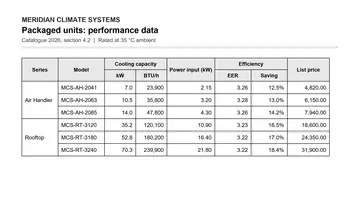
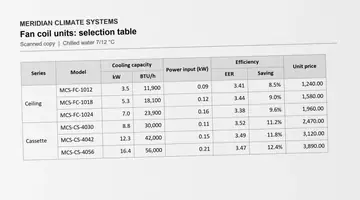
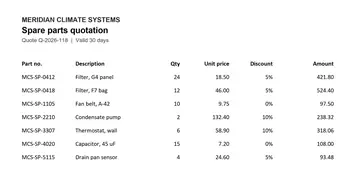
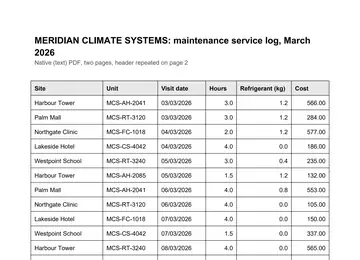
Four made-up documents, the tool’s real output on each. Scrub through the five steps, check the confidence, and click any cell to see where it came from.
Made-up sample documentsOpen the demo